

If you have ever bought something from a supermarket, pharmacy, restaurant, retail store, or convenience shop, you have probably interacted with a POS system without even realizing it.
A cashier scans a product, the system displays the price, calculates the total, accepts payment, prints a receipt, and records the transaction. Behind that seemingly simple process, however, a modern POS system can be doing much more.
A good POS system can help a business manage sales, inventory, customers, employees, payments, reporting, and even profitability from one central system.
For small businesses, supermarkets, pharmacies, restaurants, and growing retail companies, understanding how POS software works can help you determine whether your business is ready to move beyond manual record keeping.
In this article, we will explain what a POS system is, how it works, what components it typically contains, and how it can help a business operate more efficiently.
POS stands for Point of Sale.
The point of sale is simply the place where a customer completes a purchase.
Traditionally, this might have been a cash register. A cashier would enter the price of an item, calculate the total, receive cash, and provide change.
Modern POS systems have evolved far beyond simple cash registers.
Today, a POS system is usually a combination of software and hardware that allows a business to process sales while automatically recording important business information.
For example, when a supermarket sells a bottle of water for ₦500, a modern POS system can:
All of this can happen within seconds.
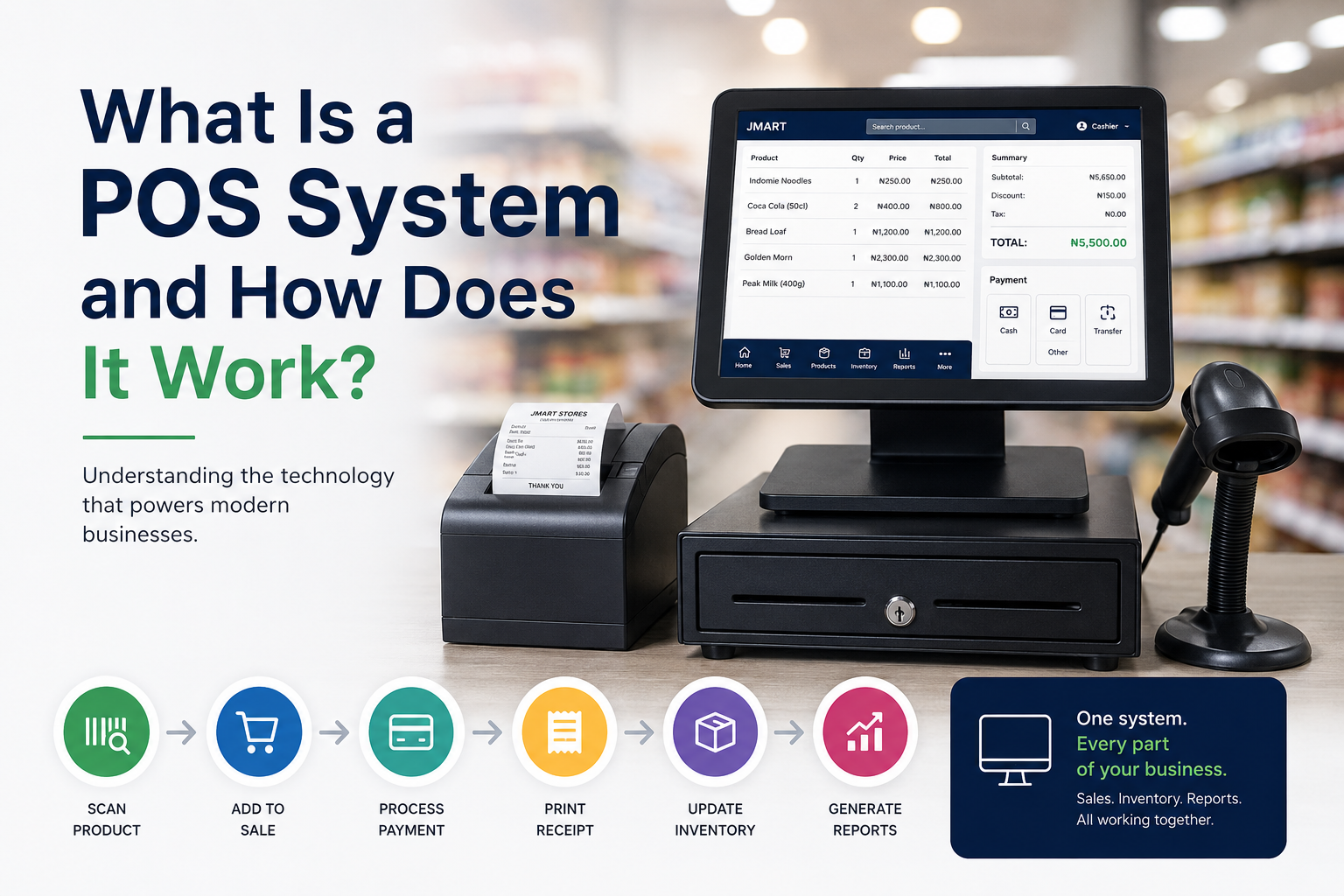
At its most basic level, the process looks like this:
Product → Identification → Price → Cart → Payment → Receipt → Inventory Update → Reports
Let's break that down.
When a customer wants to purchase something, the cashier needs to add the product to the transaction.
In many businesses, this is done using a barcode scanner.
For example, a cashier scans a box of cereal.
The POS system searches its product database and finds information such as:
The cashier doesn't need to manually type the price.
This makes checkout considerably faster and reduces pricing mistakes.
Some businesses can also search for products by name, SKU, category, or other identifiers.
Once all the customer's products have been added, the POS calculates the total amount.
For example:
| Product | Quantity | Price |
|---|---|---|
| Bread | 2 | ₦1,500 |
| Milk | 1 | ₦2,000 |
| Cereal | 1 | ₦4,500 |
| Soft Drink | 3 | ₦2,400 |
The system calculates the total automatically.
If the business offers discounts, promotions, wholesale pricing, or other pricing rules, the POS can apply those rules as well.
This is particularly useful in businesses where hundreds or thousands of transactions happen every day.
After the total has been calculated, the customer pays.
Depending on the business and the POS setup, payment may be made through:
The POS records the payment method along with the transaction.
This is important because the business can later determine how much revenue came through cash, transfers, cards, or other payment channels.
Once payment has been completed, the POS can generate a receipt.
A receipt may contain:
Depending on the system, the receipt may be printed or delivered digitally.
This gives the customer proof of purchase while also giving the business a permanent transaction record.
This is one of the most important differences between a modern POS system and a basic cash register.
Suppose your supermarket has 50 bottles of a particular product.
A customer buys 3.
After the transaction, the POS can automatically update the inventory:
50 → 47
The business doesn't need to manually remove those three units from a notebook or spreadsheet.
When this happens thousands of times across hundreds of products, automated inventory tracking can save significant time and reduce errors.
The sale doesn't simply disappear after the receipt is printed.
The POS stores the transaction.
This allows the business owner or manager to review historical information such as:
This information can then be used to make better business decisions.
A common misconception is that a POS system is simply a computer or POS terminal.
It isn't.
A complete POS solution can consist of both hardware and software.
Depending on the business, POS hardware can include:
A small shop might only need a computer and receipt printer.
A large supermarket might use several checkout stations, scanners, printers, customer displays, and other equipment.
The software is what actually manages the business processes.
A modern POS application can contain modules for:
This is why modern POS software is much more than a digital cash register.
Inventory management is one of the biggest reasons businesses adopt POS software.
Imagine a supermarket with 5,000 products.
Trying to manually track every purchase and sale would be extremely difficult.
A POS system can maintain a database containing information about every product.
For example:
Product: Golden Morn
Cost Price: ₦7,000
Retail Price: ₦8,000
Wholesale Price: ₦7,700
Current Stock: 42 units
Category: Food
Barcode: XXXXXXXX
Every time the product is sold, the quantity can be reduced.
Every time new stock is received, the quantity can increase.
This gives the business a much clearer picture of what is happening inside its inventory.
POS systems aren't only used when products are sold.
They can also help businesses manage purchasing and receiving.
Suppose a supermarket receives 100 cartons of a product from a supplier.
The manager can record the stock received in the system.
If there were previously 20 cartons:
20 + 100 = 120 cartons
The inventory is updated accordingly.
This creates a connection between purchasing, inventory, and sales.
That connection is extremely valuable for businesses with large inventories.
A good POS system should also be able to handle returns.
Suppose a customer purchases a product and later returns it.
Instead of manually adjusting the records, the business can process the return through the POS.
Depending on the system's configuration, the transaction can:
This makes it easier to maintain accurate records.
Businesses with multiple employees also benefit from user management.
A POS system can give different employees different permissions.
For example:
May be allowed to:
May be allowed to:
May have access to:
This type of role-based access helps businesses control who can perform sensitive actions.
An audit trail is a record of important actions performed within the system.
For example, imagine that ₦500,000 worth of inventory suddenly disappears.
The business owner needs to know what happened.
An audit trail can help answer questions such as:
This can make it much easier to investigate errors and suspicious activity.
One of the most powerful aspects of modern POS software is reporting.
Instead of simply knowing that you made sales, you can begin to understand what is happening inside your business.
For example, a supermarket owner might discover:
Total Sales: ₦18,500,000
Cost of Goods: ₦14,200,000
Gross Profit: ₦4,300,000
The owner could then investigate which products generated the most revenue and which products generated the highest margins.
Other useful reports may include:
The goal isn't simply to collect data.
The goal is to turn business activity into information that helps the owner make better decisions.
One important decision when choosing POS software is whether the system works primarily online, offline, or both.
A cloud-based POS typically stores business information on remote servers.
This can make it easier to access information from different locations, depending on the system.
For businesses with multiple branches, cloud technology can be particularly useful.
However, reliable internet connectivity becomes an important consideration.
An offline POS can continue operating even when the internet connection is unavailable.
This can be particularly valuable for businesses operating in areas where internet connectivity isn't always reliable.
A well-designed offline-first POS can process sales locally and synchronize relevant data when connectivity becomes available.
For a supermarket, this can be important because a poor internet connection shouldn't necessarily mean that customers cannot pay for their groceries.
Supermarkets deal with large amounts of data every day.
They may have:
Managing all of this manually becomes increasingly difficult as the business grows.
A POS system helps connect these processes.
Instead of having sales in one notebook, inventory in another spreadsheet, and purchasing records somewhere else, the business can have a centralized system connecting these activities.
Although supermarkets are one of the most obvious users of POS software, many other businesses can benefit from it.
Can use POS systems to manage products, sales, inventory, and customer transactions.
Can use POS systems to manage orders, menus, payments, and sales reporting.
Can track products, sizes, colors, inventory, and sales.
Can manage product catalogs, serial numbers, inventory, and transactions.
Can manage wholesale pricing, customers, inventory, and large transactions.
Can process high volumes of small transactions quickly.
Essentially, any business that sells products or services can potentially benefit from a POS system.
The cost varies considerably depending on the type of business and the complexity of the software.
A basic system for a small business may be relatively inexpensive, while a large enterprise system with multiple branches, advanced accounting, integrations, and extensive reporting can cost significantly more.
When evaluating the price of a POS system, don't look only at the monthly subscription.
Consider the total cost, including:
The cheapest POS system isn't necessarily the best choice.
The better question is:
Will this system save my business more money and time than it costs?
Before choosing a POS system, consider the actual needs of your business.
Important features may include:
The system should allow employees to process customers quickly.
You should be able to see stock levels and track stock movement.
The system should provide useful information about sales and business performance.
Employees shouldn't necessarily have access to every part of the system.
Important changes should be traceable.
Retailers and wholesalers may need different prices for different customers.
If your business operates in an environment with unreliable internet, offline functionality can be extremely valuable.
The system should be capable of growing with your business.
Your sales and business information should be protected.
When something goes wrong, you need somewhere to turn for assistance.
POS software and accounting software can overlap, but they are not necessarily the same thing.
A POS system is primarily focused on sales and operational transactions.
Accounting software is focused more heavily on financial records and accounting processes.
For example, a POS system might record that you sold a product for ₦10,000.
An accounting system can use that information as part of a broader financial picture involving expenses, income, assets, liabilities, and other accounting records.
Some modern business systems combine POS, inventory, and accounting capabilities into one platform.
For businesses that want fewer disconnected systems, this can be particularly useful.
It depends on the business.
If you're running a tiny operation with very few products and only a handful of transactions, manual records may initially seem sufficient.
But as the business grows, problems begin to appear.
You may start asking:
How much did we sell yesterday?
Which products are running out?
Which cashier processed this transaction?
How much profit did we make?
Why is the physical stock different from the records?
Which products are selling the fastest?
How much money did we make this month?
A properly implemented POS system can answer many of these questions much faster than manual record keeping.
Perhaps the biggest misconception about POS systems is that they are simply tools for collecting payments.
Modern POS software can be much more powerful.
Think about a business as a collection of connected activities:
Purchasing → Inventory → Sales → Customers → Payments → Reporting → Decision Making
A good POS system can connect many of these activities.
That means the business owner isn't simply recording transactions.
They are building a digital record of how the business operates.
And that information can become one of the company's most valuable assets.
At Jman Tech, we developed JMart with this broader idea in mind.
JMart is designed for businesses that need more than a digital cash register.
It combines POS functionality with tools for inventory management, sales tracking, reporting, user management, audit trails, and business intelligence.
The system is designed with businesses such as supermarkets, retail stores, pharmacies, and wholesalers in mind.
One of its key principles is offline-first operation, allowing businesses to continue processing sales even when internet connectivity is unavailable, with synchronization handled when connectivity is restored.
The goal is simple:
Give business owners better control over their operations and the information they need to make better decisions.
A POS system is much more than a machine that prints receipts.
At its simplest, it helps a business process a sale.
At its best, it becomes a central operational system connecting sales, inventory, customers, employees, purchasing, and business reporting.
For a small business, it can reduce manual work.
For a supermarket, it can help manage thousands of products.
For a growing company, it can provide the data needed to make smarter decisions.
And as a business grows, having accurate information about what is being sold, what is in stock, who is making transactions, and where money is coming from can make a significant difference.
The important thing is not simply to ask:
"Do I need a POS?"
Instead, ask:
"How much better could I run my business if I had accurate, real-time information about what is happening inside it?"
That is where modern POS software becomes truly valuable.
Interested in improving how your business manages sales and inventory?
Learn more about JMart by Jman Tech and see how modern POS and business management software can help your business operate more efficiently.